
The Digital Shed
Digital tools,
for smart growers
Agger Grand offers not just soil testing, but digital tools to help growers of all sizes optimize soil health and maximize plant yield & growth.



Choose a soil tool for your next decision
The Digital Shed brings together tools for questions that come up before planting, while managing a crop, and after a soil test. Start with the decision you need to make. A texture estimate helps with watering; a laboratory result helps with nutrient planning; a compost recipe helps balance materials. These tools work best when you record where your inputs came from and compare the output with what you see in the growing area.
Keep separate records for beds, fields, and containers that have different soil or management histories. A number from one plot may not describe another. Note the sampling date, depth, units, recent amendments, and crop you plan to grow. Save the original laboratory report so you can check the meaning of each value later. Repeating a measurement with the same method makes comparisons more useful than collecting many unrelated numbers.
Soil Texture Calculator
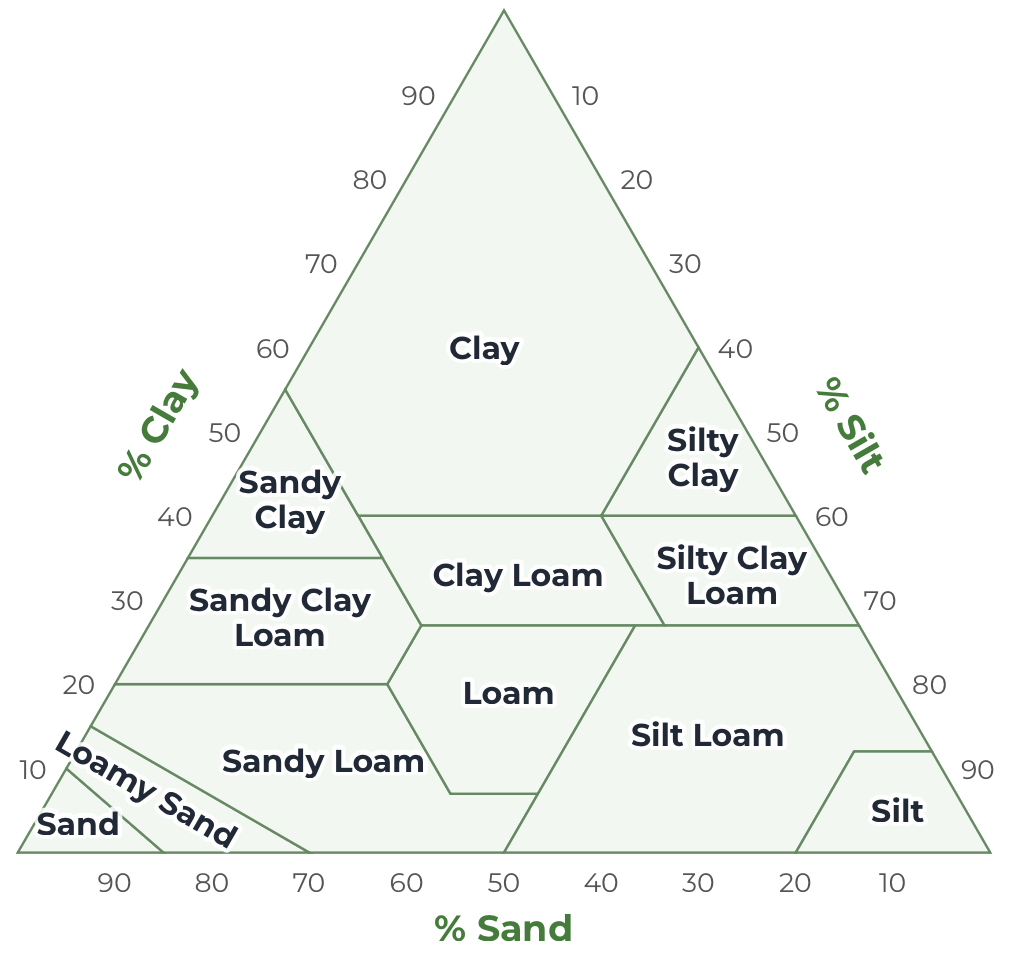
Enter sand, silt, and clay percentages, or the individual layer heights from a jar test. The Soil Texture Calculator estimates a USDA texture class. Use that class to think about drainage, irrigation frequency, and the way soil feels when wet. Texture does not measure fertility or identify a soil order. If an important decision depends on an accurate result, request laboratory particle size analysis.
USDA Soil Map
The SSURGO Soil Map provides a starting point for learning about mapped soils around your property. Search for a location, zoom in, and select a survey area to inspect available information. Map units can include several soil components. Boundaries describe a survey rather than an exact test of your garden bed, so compare the map with drainage, slope, and soil observations on site.
Compost Carbon and Nitrogen Calculator
Use the compost material table to compare ingredients and build an estimated recipe. Brown materials supply carbon and structure; green materials generally supply more nitrogen. Enter realistic weights and moisture values. The result is a planning estimate because leaves, manure, and kitchen scraps vary. Adjust the pile using smell, moisture, temperature, and how quickly the materials break down.
Nutrient Input and Soil Dashboard
The nutrient calculator helps explore measured soil values. Match the units and extraction method on your report with the inputs requested by the tool. Use the Soil Dashboard to keep plot records and compare tests over time. Recommendations need crop and field context; avoid applying a product simply because a calculator shows a low value.
Carbon Sequestration Estimates
The Carbon Tracker explores soil carbon assumptions. Record the area, depth, bulk density, and organic matter information used for any comparison. An estimated stock is different from a measured change, and neither automatically establishes a carbon credit. Keep sampling consistent and review the limits of the model before using a result in a report.
A useful seasonal workflow
Before the season, review the soil map and collect representative samples. Use the texture calculator to support watering decisions, then compare laboratory values with your crop plan. During the season, record amendments and observations. After harvest, review the records to choose the next question to test. Explore the soil science blog when you need background, or compare soil test kits when estimates are no longer enough.